
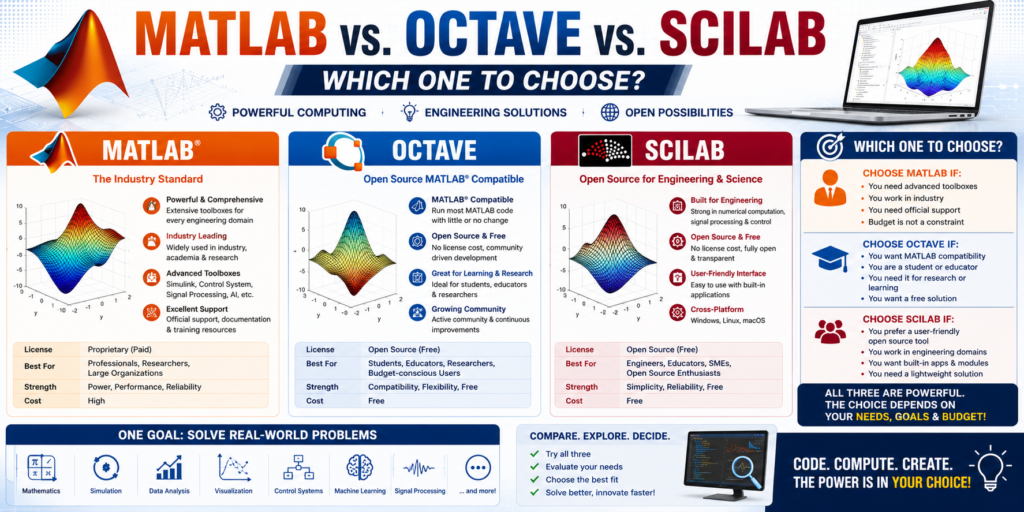
Mathematical modeling and simulations are essential in engineering and science. Here is a comparison of three powerful resources:
### 1. MATLAB: MATLAB is a high-performance language for technical computing. It integrates computation, visualization, and programming in an easy-to-use environment. It is widely used in industry but requires a paid license.
### 2. GNU Octave: Octave is a high-level interpreted language, primarily intended for numerical computations. It is the most popular open-source alternative to MATLAB, offering a largely compatible syntax, making it ideal for those who need MATLAB-like functionality for free.
### 3. Scilab: Scilab is another free, open-source software for numerical computation. While its syntax differs slightly from MATLAB, it provides a powerful environment for engineering and scientific applications, including a graphical editor for dynamic systems called Xcos.
**Which one to choose?** –
Choose **MATLAB** if professional support and industry-standard toolboxes are needed.
Best for: Aerospace, automotive, control systems, and complex, multi-domain simulations.
Graphical Simulation: Features Simulink, a premier block-diagram environment for dynamic and embedded system modeling.
Pros: Unmatched computational speed, massive library of professional toolboxes, top-tier documentation, and direct hardware support (e.g., Arduino/Raspberry Pi deployment).
Cons: Expensive proprietary software requiring paid licensing
Licensing information and downloads directly are available via the MathWorks Official Website. Its cloud-based version can be checked at MATLAB Online.
Choose **Octave** if a free tool that is highly compatible with MATLAB scripts is required.
Best for: Students, researchers, and engineers who want a free, open-source MATLAB substitute without learning a new language.
Syntax: Highly compatible with MATLAB script; you can run most MATLAB scripts in Octave with minimal alterations.
Pros: Completely free, lightweight, and functions on nearly identical core mathematical syntax.
Cons: Slower than MATLAB for heavy computations; lacks advanced proprietary features like Simulink and some newer commercial toolboxes.
GNU Octave: The software installer and package ecosystem can be found on the GNU Octave Official Website. If you prefer to test your mathematical models in a browser without installing anything, use Octave Online.
Choose **Scilab** for a robust, free alternative with strong simulation capabilities like Xcos.
Best for: Education, basic academic projects, and open-source block-diagram modeling.
Graphical Simulation: Features Xcos, a robust, free alternative to Simulink.
Pros: Free, open-source, and highly capable for basic engineering computations.
Cons: Syntax is not identical to MATLAB, meaning a learning curve is required if you are transitioning from or collaborating with MATLAB users.
Scilab: You can download the core computational engine and the Xcos modeling window directly from the Scilab Official Website.